Turn a long video into Shorts
Vid2Shorts is a free web app that turns a long video into vertical Shorts for YouTube Shorts, TikTok, and Reels. Paste a link. It reads the whole transcript and queues its strongest moments, ranked and scored, or you pick the exact moment yourself. Either way you get smart 9:16 framing, word by word captions, and a clean export. Finished Shorts, not homework.
First Short free. No account, no software, nothing to upload.
- Shorts
- TikTok
- Instagram Reels
- Facebook Reels
- 1080×1920 MP4
- word by word captions
- subject aware 9:16
Vertical throws away two thirds of your picture.
A widescreen frame is 1920 across. A Short is 1080 across. Something has to go, and where it goes from is the difference between a clip you post and a clip you delete. Same source frame below, cropped both ways.
 Centre cropAuto-frame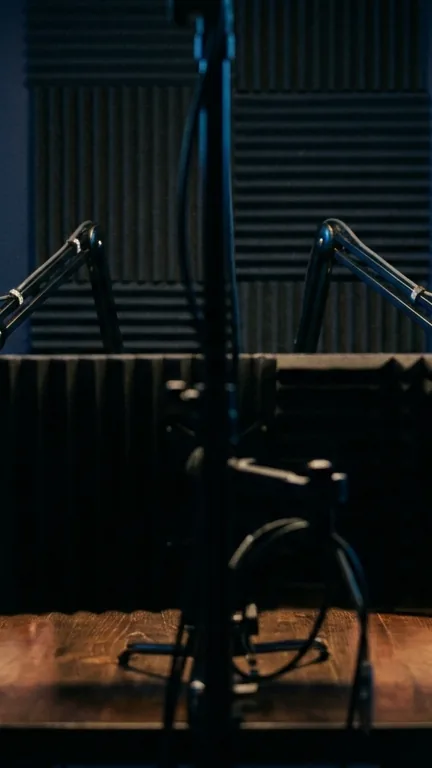
Nobody is in the shot
Take the middle and hope. On a two shot the middle is the gap between the people, so the crop lands on microphone stands and an empty wall. This is a real crop of the frame above, not an illustration.
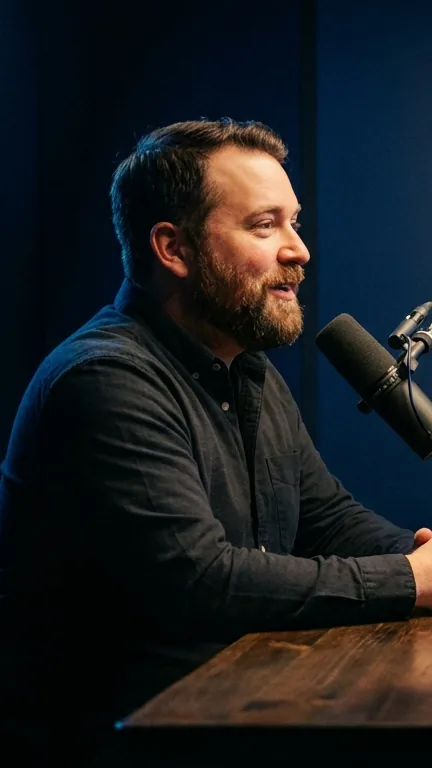
The speaker, properly framed
Same frame, same window size, moved onto the person. It follows whoever is talking as the conversation switches, and when it cannot find a subject with confidence it stays centred rather than guessing wrong.
The whole tool in nine lines.
For people in a hurry, which is everyone making Shorts.
- What it is: a video to Shorts converter that runs in your browser.
- Input: a link to any public video. No file upload, ever.
- The assisted part: it reads the transcript, finds complete moments, and ranks them with a scored breakdown. You decide what gets made.
- Output: vertical 1080 by 1920 MP4, the exact format Shorts, TikTok and Reels want.
- The editor: a full Shorts Studio with an Easy wizard for speed and a Studio mode for control.
- The framing part: Auto-frame follows the speaker, so faces stay in the shot. You can drag to reframe any time.
- Captions: word by word, bold, synced, burned in. Arabic fully supported.
- Price: first Short free with no account. Pro removes limits and watermarks.
- Made by: a small independent team that has been building video tools since 2025.
How to make Shorts from a long video.
No software to install, no files to upload. The heavy work happens on our servers.
Paste the link
Drop in a link to any public video: a podcast, an interview, a stream VOD, a lecture, your last upload. The longer the video, the more moments there are to find.
Get the moments
Let it queue the strongest moments, ranked and scored, or open the Studio and drag the exact range yourself on a real timeline. Preview everything in a phone frame before you commit.
Download and post
The clip is cut, reframed to vertical with the speaker centered, and captioned. One MP4, correct size, correct ratio. Post it to Shorts, TikTok and Reels as is.
Three hard problems, handled for you.
Anyone can chop a video into pieces. The difference between clips and Shorts that perform is what happens in these three places.
Moments, not chops
It reads the timestamped transcript and looks for complete moments: a hook, a build, a payoff. Never a clip cut off before the punchline lands. Each pick explains itself with a score for hook, emotion, quotability, and completeness.
Reframing that follows the subject
Vertical keeps about a third of a widescreen picture. Center cropping blindly is why other tools ship Shorts with half a face at the edge. We look at where the subject is in the actual footage and place the crop there, clip by clip.
Captions people can read at a glance
Word by word timing, bold display type, high contrast. Sound off viewing is the default on every short form feed, and captioned clips simply hold attention longer. Arabic and right to left scripts render correctly, not as blank boxes.
The people already doing this every day.
If you publish long video anywhere, the Shorts are already in there.
Podcasters
A one hour episode holds five to ten strong moments. Clip them the day the episode drops and feed your Shorts shelf all week, each one pointing new listeners back to the full conversation.
Channel owners
Shorts are the discovery engine every feed pushes hardest right now. Repurposing your long uploads costs nothing and puts your best thirty seconds in front of people who have never seen your channel.
Streamers
The VOD is full of moments your chat already told you were good. Paste the VOD link, let it surface the reactions, and post them while the stream is still fresh.
Educators and coaches
One idea per Short beats an hour of lecture for reach. Pull the sharpest explanations out of webinars and courses and let each one travel on its own.
Vid2Shorts next to the alternatives.
The big names are good products. Here is where we differ, stated plainly.
| Tool | Starts free, no signup | It finds the moments | Subject aware reframing | Built for |
|---|---|---|---|---|
| Vid2Shorts | Yes, first Short free | Yes, ranked and scored | Yes | Creators who want finished Shorts fast |
| OpusClip | Trial, account required | Yes | Yes | Teams and agencies on subscription |
| Klap | Limited free, signup | Yes | Yes | Volume clipping on subscription |
| CapCut / Premiere | Manual work | You do it by hand | You do it by hand | Editors who want full control |
| Random free clip sites | Usually | No | Blind center crop | One off cuts, no captions |
Questions people actually ask.
Straight answers, no fine print surprises.